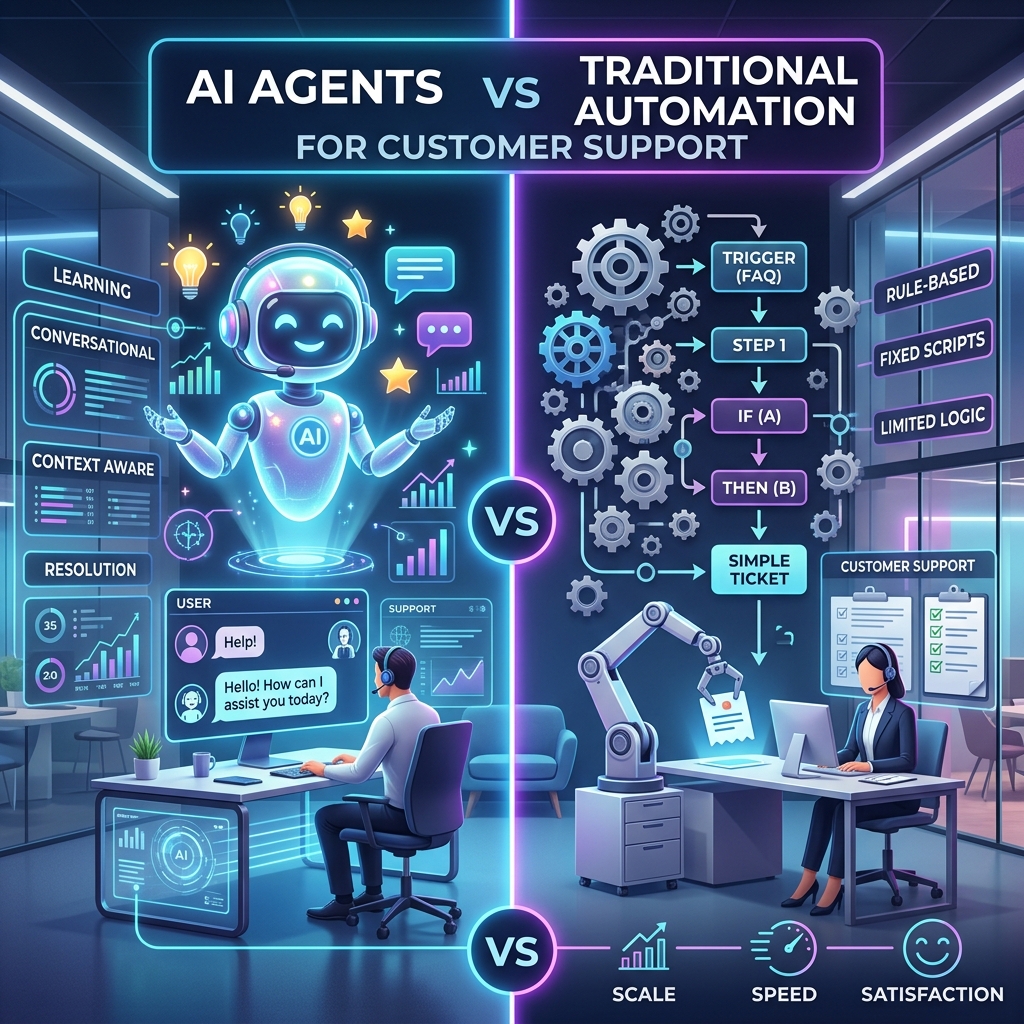
Customer support remains the most common application area for automation and artificial intelligence, and in this case, choosing either poorly results in a significant loss for a business. A misdirected request for a refund means losing some profit. A wrong response from an AI regarding a policy question will cost a business the customer’s trust.
The following guide deals exclusively with support: ticket routing, chatbots, automation of help desks, and AI agents for support. It is not the debate about “AI vs Automation” as your actual question is before the planning cycle ahead of you.
Quick answer
Traditional automation (rule-based chatbots, ticket routing rules, canned macros) is the better choice for FAQs, order status, password resets, and any request with a fixed, known answer.
AI agents are the better choice when a request requires reading free-form text, checking multiple systems, and deciding on a response — think billing disputes, multi-part complaints, or anything requiring account context.
Most mature support teams run both together: automation handles the deterministic 40–60% of volume, an AI agent handles interpretation and drafting for the rest, and humans retain approval on refunds, cancellations, and anything account-changing.
AI Agents vs Traditional Automation in Support, at a Glance
| Factor | Traditional automation (rule-based chatbot, routing) | AI agent |
|---|---|---|
| Handles | Fixed-intent queries: order status, hours, password reset | Open-ended queries: complaints, multi-issue tickets, context-dependent requests |
| Understands | Exact keywords or button clicks | Natural language, tone, intent |
| Consistency | Identical answer every time | Can vary slightly between similar tickets |
| Setup effort | Lower — define intents and flows | Higher — needs knowledge base, guardrails, testing |
| Escalation trigger | No match found / keyword missing | Low confidence, policy exception, sentiment |
| Best fit | Tier-1, high-volume, low-risk queries | Tier-1 and tier-2 interpretation, drafting, and triage |
| Risk if wrong | Customer gets “I don’t understand,” retries | Customer gets a confident but incorrect answer |
| Ongoing cost driver | Flow maintenance as products/policies change | Model usage, prompt tuning, evaluation |
What “Traditional Automation” Looks Like in a Support Team
In a support context, traditional automation usually means:
- Rule-based or decision-tree chatbots (“click here for billing, here for shipping”)
- Keyword-triggered ticket routing (a ticket containing “refund” goes to billing)
- Macros and canned responses
- SLA timers and auto-escalation after X hours
- Auto-tagging based on form fields
- Order-status and account-status lookups triggered by a fixed input
These systems are deterministic: the same input reliably produces the same output, and every branch of the logic was written by someone in advance. That’s exactly why they’re fast, cheap to run, and easy to audit — and also why they break the moment a customer phrases something the rules didn’t anticipate.
What an “AI Agent” Looks Like in a Support Team
An AI agent in support reads the incoming message, pulls relevant account or order data, checks it against policy or a knowledge base, and either resolves the issue directly or hands it to a human with a summary. Concretely, it can:
- Read a free-form complaint and identify the actual issue, not just the keyword
- Pull the customer’s order history, subscription status, or past tickets from connected systems
- Draft or send a response grounded in your actual policies
- Recognize when a request needs human sign-off (refund above a threshold, account deletion, legal complaint) and route it with context attached, rather than just a raw ticket
- Learn from a knowledge base without every path being manually mapped
What is relevant for the operational distinction is this: a rules-based chatbot botches the task when it says “I don’t understand.” However, an unconstrained AI agent botches it when it gives a wrong yet convincing reply, which is an even worse failure for support than the former.
What the 2026 Data Actually Shows
There’s a lot of AI-in-support statistics circulating, and a fair amount of it is vendor marketing dressed up as research. Worth separating the two before making a budget decision. For the full cost-and-risk comparison beyond support use cases, see our AI agents vs traditional automation guide.
- Adoption is real and accelerating. Salesforce’s 2026 State of Service research found that 66% of service organizations were running AI agents in 2026, up from 39% in 2025 — a 1.7x jump in a single year — and 91% of CX leaders reported executive pressure to deploy AI.
- But there’s a meaningful gap between what vendors claim and what independent benchmarks show. While individual AI support vendors publish deflection rates of 70–80%, industry compilations citing Zendesk’s own enterprise-wide data put the median deflection rate across all customer programs at around 41%, with only the top quartile of implementations reaching closer to 59%. That 30-point gap is the difference between a cherry-picked case study and what a typical company actually achieves.
- Escalation reduction is one of the more consistent, well-supported findings. Gartner-sourced data cited across multiple 2026 industry reports puts the reduction in human escalations from AI agents (versus rule-based chatbots alone) at roughly 45%, driven by better first-contact resolution.
- Scaling maturity lags adoption badly. Several 2026 industry roundups note that while nearly all contact centers report using AI in some form, only around one in ten have moved past limited pilots to a fully scaled, optimized deployment.
The takeaway for a business evaluating this today: adoption headlines overstate typical results. Budget and plan around the enterprise-median numbers (40–60% deflection, meaningful but not dramatic escalation reduction), not the vendor best-case numbers — and expect the first few months to be a pilot, not a full rollout.
Where the Line Actually Falls
Keep on traditional automation
- Order status, tracking, and shipping updates
- Password resets and account-access issues
- Business hours, store locations, return policy lookups
- Appointment confirmations and reminders
- Anything where the answer is identical for every customer who asks
Move to an AI agent
- Billing disputes involving specific account history
- Multi-part complaints (“my order was late AND damaged AND I was charged twice”)
- Requests that require checking more than one system before responding
- Tickets where tone or urgency should change the response
- After-hours coverage for anything beyond FAQ-level questions
Keep a human in the loop regardless of which system handles the first pass
- Refunds above a defined dollar threshold
- Account cancellations or deletions
- Any complaint involving safety, legal, or regulatory language
- Cases where the AI agent’s own confidence score is low
A Realistic Hybrid Workflow
Here’s how a mid-size e-commerce or SaaS support team might combine both, end to end:
- A customer emails about a duplicate charge after canceling a subscription.
- Traditional automation tags and routes the ticket based on the “billing” keyword and opens an SLA timer.
- An AI agent reads the message, pulls the account, subscription, and payment history via API.
- It checks the refund against a fixed policy rule (a deterministic check, not a model guess): is the cancellation date before or after the charge date, and is the amount under the auto-approval threshold?
- If it’s within policy and under the threshold, traditional automation executes the refund and sends a confirmation.
- If it’s outside policy or above the threshold, the case routes to a human with the AI agent’s summary and evidence attached.
- Every step — what was read, what was decided, what was sent — is logged for audit.
The agent handles understanding and judgment. The deterministic rule handles the money. That split is what keeps this safe enough to actually deploy.
Costs and Risks Specific to Support
Cost drivers. Traditional automation costs scale with the number of intents and flows you maintain — cheap at first, expensive once you have hundreds of edge cases. AI agent costs scale with conversation volume, model usage, and how much retrieval and tool-calling each ticket requires; expect ongoing spend on evaluation and monitoring, not just the initial build.
The risk that’s specific to support: a wrong answer from a chatbot is usually obvious to the customer and gets retried. A wrong but confident answer from an AI agent — an incorrect refund amount, a misstated policy, a promise the company can’t keep — can go out looking authoritative and create a real liability. This is the reason financial actions (refunds, credits, cancellations) should sit behind a deterministic rule or human approval, never behind the model’s judgment alone.
Decision Checklist
Score your support use case honestly:
- Does the answer depend on reading free-form text rather than a fixed field?
- Does resolving it require checking more than one system?
- Do exceptions to policy happen regularly?
- Would a human currently need to use judgment to answer it?
- Is the financial or reputational cost of a wrong answer high?
Mostly “no” → traditional automation is enough, and cheaper. Mostly “yes” on the first four but “yes” on the last one too → AI agent for interpretation, with a deterministic rule or human approval gating the actual action.
FAQ
Do AI agents replace rule-based chatbots in customer support?
No. Rule-based automation is still faster and cheaper for fixed-answer queries like order status or hours. Most 2026 deployments use AI agents alongside automation, not instead of it.
What percentage of support tickets can AI agents actually resolve?
Enterprise-wide medians sit closer to 40–60% deflection, not the 70–80% figures some AI vendors advertise from their best customers. Realistic planning should use the lower, independently benchmarked range.
Is it safe to let an AI agent issue refunds automatically?
Only within a fixed, deterministic policy rule and a defined dollar threshold. Above that threshold, or outside policy, the decision should route to a human — the AI agent should gather and summarize the case, not make the final call on money.
How long does it take to see ROI from an AI support agent?
Most organizations are still in the pilot-to-scale phase in 2026; only a small share have reached full scale. Budget for a multi-month pilot on one ticket category before expanding, and measure deflection rate, escalation rate, and resolution time against your own pre-AI baseline rather than industry averages.
Ready to Elevate Your Customer Support?
Stop choosing between efficiency and customer satisfaction. Discover how our tailored AI Agent solutions can seamlessly integrate with your existing support workflows to automate the repetitive tasks and empower your team.

Launch Your Vision With Us
Join CoderScotch to unlock tech possibilities! Collaborate on innovative projects, get expert support, and turn ideas into success with your trusted partner
Inquiry NowRecent Blogs

Pin up Az təcrübəsini addım-addım müqayisə edən yoxlama siyahısı
Sep 24, 2026
8 min
AI Agents vs Traditional Automation Which Is Better for Business
Jul 20, 2026
18 min

Money Transfer App Development: How to Build an Online Remittance App Like Wise
Jul 03, 2026
10 min
Tags
Share Your Requirements!

Share:
Preferred source on